

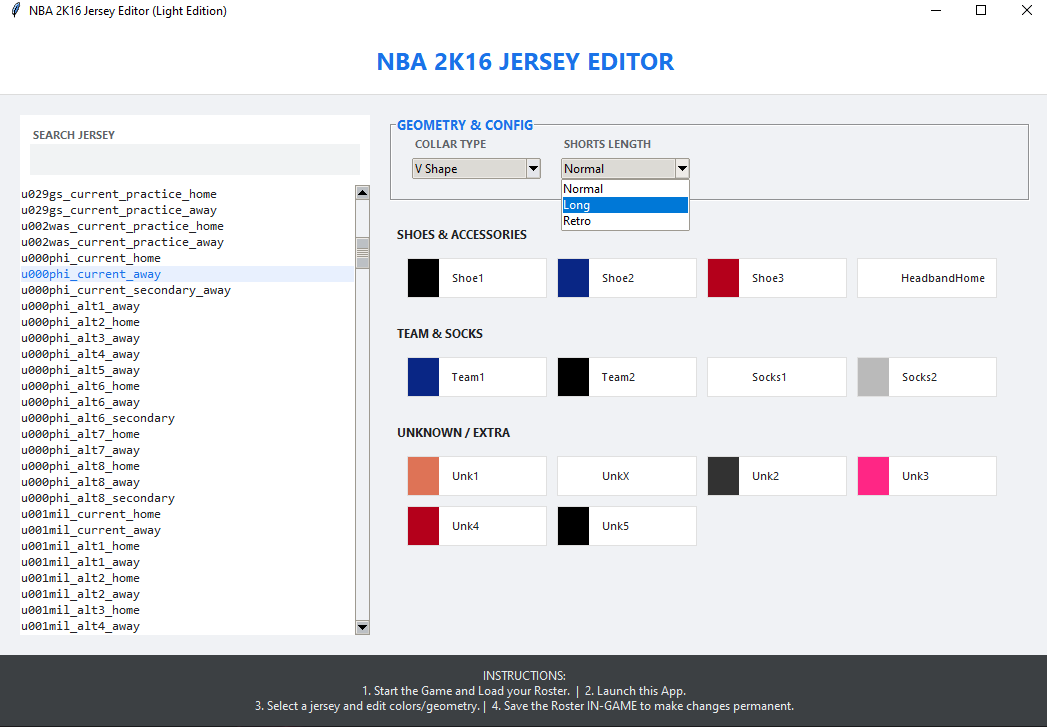
NBA 2K16 JERSEY EDITOR
INSTRUCTIONS:
1. Start NBA 2K16 on your PC.
2. Load your Roster inside the game.
3. Open "NBA2K16_Jersey_Editor.exe".
4. Select a jersey from the list (Left Panel).
5. Edit colors, collar types, and shorts length.
- Use the Color Boxes to pick colors.
- Use Dropdown menus for Collar and Shorts.
6. IMPORTANT: You must SAVE your Roster inside the game to make changes permanent.
NOTES:
- The tool reads memory live. If you restart the game, restart the tool.
- If a jersey doesn't appear, ensure you have loaded into a mode where the roster is active.
Need help uploading files? Watch this video tutorial!
Contributor Notes
1. When adding a new version of an existing file, please edit the previous upload.
2. The maximum upload size is 150 MB. For larger files, please contact us or use the external link option.
3. You only need to specify a file size if you are linking to an external file.
4. Please don't overuse BBCode formatting and smilies in your file descriptions. Please also try to keep file descriptions to an acceptable length.
5. If you are not the author of a file, make sure you have permission to upload it. No stolen work!
6. All uploads must comply with the posted Forum rules.
1. When adding a new version of an existing file, please edit the previous upload.
2. The maximum upload size is 150 MB. For larger files, please contact us or use the external link option.
3. You only need to specify a file size if you are linking to an external file.
4. Please don't overuse BBCode formatting and smilies in your file descriptions. Please also try to keep file descriptions to an acceptable length.
5. If you are not the author of a file, make sure you have permission to upload it. No stolen work!
6. All uploads must comply with the posted Forum rules.
|
|
|
This download was added Wed Jan 28, 2026 2:27 am by nba2kfadeaway • Last download Thu Jan 29, 2026 11:02 am

Similar Downloads
Download MOD © by Hotschi, Demolition Fabi, OXPUS •
Download MOD English language © by OXPUS •